

Dynamic routes and loader functions in Remix
With the changes we have made in the previous lesson, we have a news category page set up, but the content is always the same:

When we click each link, the URL changes in the browser’s address bar, but the content in the window remains the same.
Why?
Route params
Section titled “Route params”The $ sign in the file name news/$category.tsx is actually a special character that tells Remix that this route is dynamic.
It means that the route can match any base URL that starts with /news/, but then will have a unique value for category.
So, for example, if we visited the URL:
http://localhost:3000/news/business…the $category value would be the string “business”.
However, if we visited
http://localhost:3000/news/reviews…the $category value would then be the string “reviews”, and so on.
Reading route params with the loader function
Section titled “Reading route params with the loader function”To read the category value from the URL, we need to add something called a loader function to our news/$category.tsx file.
At first, let’s just log the category value out to the console and see what it looks like.
Carefully add the following code to your news/$category.tsx file:
import { type LoaderFunctionArgs, data } from 'react-router'
export async function loader({ params }: LoaderFunctionArgs) {  const { category } = params
  console.log({ category })
  return data({})}
export default function NewsCategoryPage() { return ( <div className="container py-16"> <h2 className="text-h2">Generic news category page</h2> </div> )}Head back to your browser and click the links between the different news categories.
Now check your VS Code terminal. You should see the category value logged out each time you click a link:
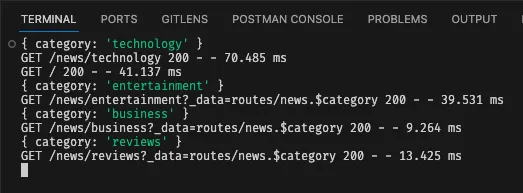
This is great!
We are loading the dynamic category value directly from the URL and logging it to the console.
In the next step, we will do something more useful with this value. We will pass it to our NewsCategoryPage component and display it on the page.
Summary
Section titled “Summary”In this step, we have:
- Deleted our hard-coded static child routes and replaced them with a single dynamic route.
- Learned about route params and how they can be used to create dynamic routes in Remix.
- Added a
loaderfunction to our dynamic route to read thecategoryvalue from the URL. - Logged the
categoryvalue to the console to see what it looks like.
What’s next?
Section titled “What’s next?”In the next step, we will pass the category value to our NewsCategoryPage component with Remix’s useLoaderData hook, and display it on the page.